How to Check If an Email Link Is Safe Before You Click
How many times have you opened an email and found a link staring back at you? You don't know where it goes. You don't know what waits on the other side. You click it anyway, because that's what we do.
That small habit can put your information, your money, and your peace of mind at risk.
You don't have to gamble every time an email lands in your inbox. A safer way exists, and it takes less than a minute to learn.
As a music producer, my email box is full of the “Latest, greatest thing to make better music”. The link below came from an email that was offering a tool to make music sound better by removing the “muddy” sound.

The Real Danger Hiding in Your Inbox
Scammers count on one thing: your trust. They dress up their emails to look like they came from your bank, a delivery service, or a company you already know. The link inside looks normal at first glance. But that link can carry you to a fake website built to steal your password, or it can quietly load harmful software onto your phone or computer.
You don't need special training to fall for one of these tricks. Even careful people get fooled, because the emails are built to look real.
Why You Should Never Click First
Here's an old piece of wisdom worth keeping: look before you leap. That advice fits email links perfectly.
Once you click a bad link, the damage starts right away. You may not see anything wrong on the surface. Meanwhile, the site behind that link could already be collecting your information or loading harmful code onto your device.
The safest choice is simple. Check the link before you ever click it.
The Safe Way to Check a Link
You can find out where a link leads without ever clicking it. Here's how.
On your phone, DON’T CLICK THE LINK. Instead, press and hold the link instead of tapping it. A menu will pop up, and you can choose "Copy Link" or "Copy URL." On a computer, right-click the link and choose "Copy Link Address." Either way, you now have the web address copied, without opening it.
This one habit gives you the power to check a link on your own terms.
Use a Free Tool to Check the Link
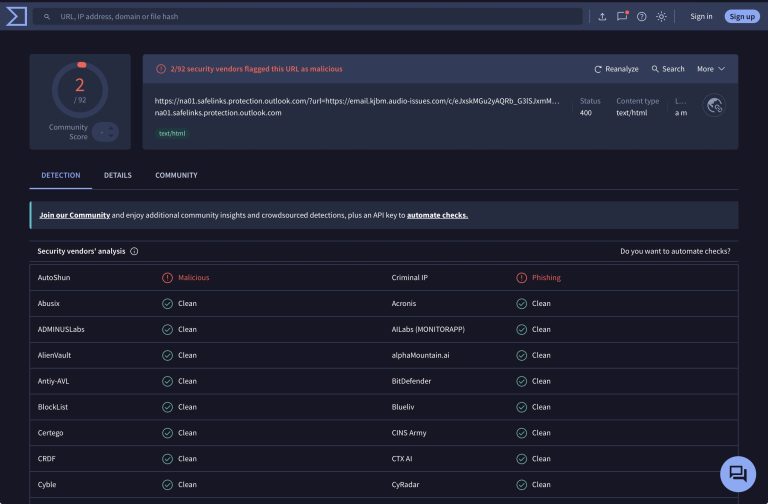
Once you copy the link, paste it into a website built to check links for danger. One free option is VirusTotal.com. Paste the link into the search bar, and the site will scan it against dozens of security services at once.
Within seconds, you'll see whether other security companies have flagged that link as harmful. If even one or two services mark it as malicious, treat it as a warning sign. Don't click through, and don't enter any personal information tied to that email.
This article carries no partnership with VirusTotal. It's simply a free tool that can help you stay safe.
What to Do If a Link Comes Back Malicious
If a scan flags the link, delete the email and block the sender. Blocking stops that address from reaching your inbox again, and it cuts off any follow-up attempts. Don't reply, don't click anything else inside it, and don't forward it to anyone unless you're warning them about the same scam.
If the email claims to come from your bank or a company you trust, contact that company directly through their official website or phone number. Don't use any contact information found inside the suspicious email itself.
Simple Habits That Keep You Safe
Old-fashioned caution still holds up well in a digital world. Slow down before you click. Check the sender's email address closely. Trust your instincts if something feels off.
You don't have to become a computer expert to protect yourself. You only need one simple habit: